◆ Free & Lightweight · Windows 10/11
The auto clicker built for gaming.
Roblox, Minecraft, MMO, idle & clicker games — set your clicks-per-second, point your mouse, hit one button. Small Windows installer, no ads.
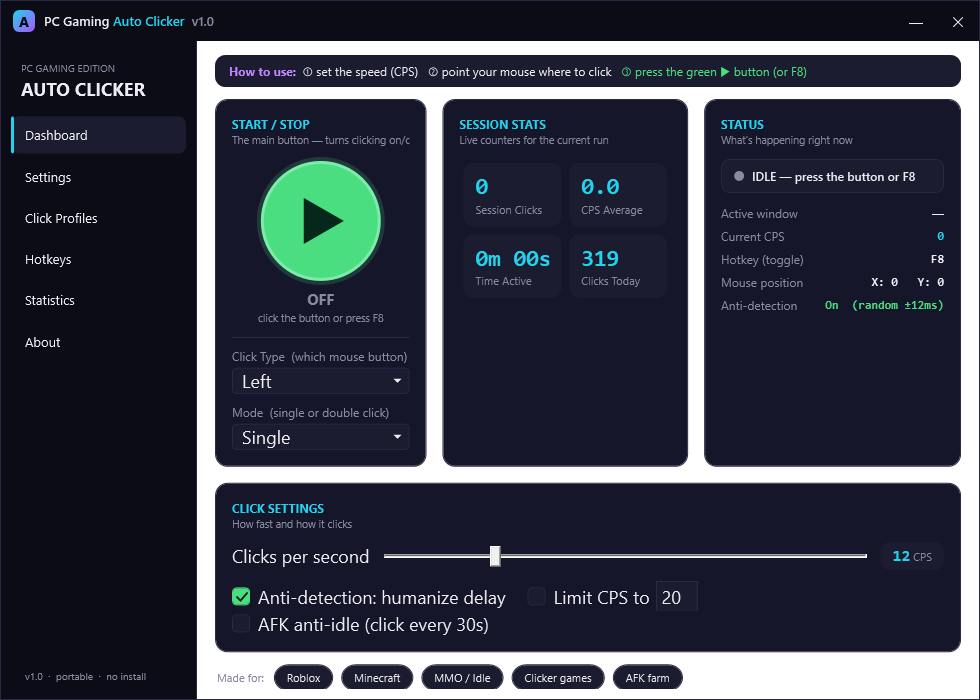
Roblox, Minecraft, MMO, idle & clicker games — set your clicks-per-second, point your mouse, hit one button. Small Windows installer, no ads.
Everything you need
A clean gaming dashboard with just the controls that matter — no clutter, no setup.
1 to 50 clicks per second with a simple slider. Dial in exactly the speed your game needs.
Real press-and-hold clicks that actually register in Roblox, Minecraft and other windowed games.
F6 start, F7 stop, F8 toggle — control it without leaving the game window.
Optional humanized random delay so the click rhythm looks natural, not robotic.
One gentle click every 30s so idle games won't kick you for being inactive.
Save your favourite setups as named presets and load them in one click.
Session clicks, current CPS, time active and clicks-today, right on the dashboard.
Left, right or middle button · single or double click. Your call.
Lightweight Windows installer. Runs on the .NET Framework already on Windows 10/11 — no extra dependencies to chase.
Three steps
No account, no config files. Download, unzip, run.
Drag the Clicks per second slider to the rate you want.
Hover the cursor over the spot you want clicked — it clicks right there.
Hit the big green button to start, press again — or tap F8 — to stop.
Ready to click
Windows 10/11 · lightweight installer · open source.